Learn about how PXP's Drop-in solution works.
Checkout Drop-in is a single, unified payment component that automatically orchestrates multiple payment methods in a beautiful vertical accordion interface. It's built on top of the Checkout SDK, reusing all the same secure payment logic while providing a dramatically simplified integration experience.
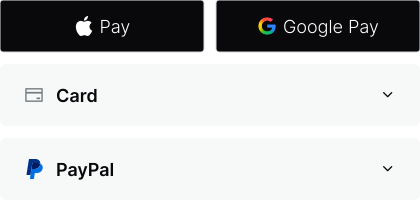
- Five-line integration: Get a complete checkout running in days, not weeks. Perfect for merchants who want speed over customisation.
- Zero PCI scope: All sensitive card data is tokenised by PXP's Token Vault — your servers never touch payment data.
- Automatic 3DS authentication: Intelligent risk-based 3D Secure authentication happens automatically when required, with no additional code needed.
- Unified callbacks: One set of callbacks across payment methods
onSuccess,onError,onBeforeSubmit, and more. - Automatic payment method expansion: When PXP adds new payment methods, they automatically appear in your drop-in with zero code changes.
A full integration involves the following five high-level steps:
- Set up the Unity Portal: To use Checkout Drop-in, you first need to activate the Drop-in service and your chosen payment methods in the Unity Portal. You also need to configure your branding, whitelist domains where the drop-in will be hosted, and set up webhooks for payment verification.
- Install the SDK: Install the latest version of the SDK using npm, then import from the
drop-insubpath. - Embed Checkout Drop-in: Initialise the drop-in, pass in your session data and transaction details, and mount it.
- Handle results: Add proper handling for events and errors. Implement analytics to monitor your customers' payment journeys.
- Process and verify transactions: The customer completes their payment through the drop-in. The SDK validates form data, tokenises the card (if needed), and sends the transaction to PXP. After processing, the SDK triggers an
onSuccesscallback with aresultobject containing transaction identifiers (result.merchantTransactionIdandresult.systemTransactionId).
Ready to get started? Follow the quickstart for your platform for a complete walkthrough, or see the implementation guide for detailed configuration options.
Drop-in automatically detects and displays payment methods based on your Unity session configuration and platform capabilities:
- Cards: Visa, Mastercard, American Express, and others (all platforms)
- PayPal: PayPal (all platforms), Pay Later (all platforms), and Venmo (Web only)
- Google Pay: Android and Web only
- Apple Pay: iOS and Web only
- Aeropay: Pay by bank via Aeropay (all platforms). USD and
Ecomonly. Appears in the accordion, not in quick selection.
Payment methods appear in the order configured in your Unity Portal (paymentMethodOrdering.manualOrder), and future payment methods will be automatically added to Drop-in as they become available.
The Web drop-in uses a mobile-first vertical accordion design:
- Only one payment method expanded at a time
- Top payment method expanded by default
- Gradient cards with shadows and hover effects
- Professional SVG logos for payment methods
- Smooth animations on expand/collapse
- "Secured by PXP" branded footer
The drop-in automatically adapts to different screen sizes:
- Mobile (< 576px): Full-width cards, stacked fields, touch-optimised buttons
- Tablet (576-768px): Comfortable spacing, responsive padding
- Desktop (> 768px): Optimal spacing, hover effects active
During initialisation, you specify the transaction intent for each payment method. The intent determines how the payment is processed and when funds are captured.
Cards support the following transaction intents:
| Intent | Description | Use cases |
|---|---|---|
Authorisation | Reserve funds on the customer's payment method without capturing them. Capture later when ready to fulfill. |
|
EstimatedAuthorisation | Reserve funds based on an estimated amount. Final capture amount can differ from initial authorisation. |
|
Purchase | Capture funds immediately after authorisation. Single-step payment. |
|
Verification | Verify the card is valid without charging or reserving funds ($0 authorisation). |
|
Apple Pay uses the card field on DropInTransactionIntentData — the same intent you configure for card payments. Typical Apple Pay flows use:
| Intent | Description | Use cases |
|---|---|---|
Authorisation | Reserve funds for later capture. |
|
Purchase | Capture funds immediately. |
|
Google Pay is not available on iOS. Google Pay intents apply to Web and Android only.
PayPal supports the following transaction intents:
| Intent | Description | Use cases |
|---|---|---|
Authorisation | Authorise a payment to be captured later ("Confirm Payment" flow). |
|
Purchase | Capture payment immediately ("Pay Now" flow). |
|
Aeropay supports the following transaction intents. There's no SDK default; you must set an Aeropay intent when Aeropay is enabled. Drop-in doesn't support Payout — use the standalone Aeropay button component for payouts.
| Intent | Description | Use cases |
|---|---|---|
Authorisation | Reserve funds for later capture. |
|
Purchase | Capture funds immediately. |
|
EstimatedAuthorisation | Reserve funds based on an estimated amount. |
|
Aeropay only supports USD and EntryType.Ecom. Missing intent, non-USD currency, or a non-Ecom entry type prevents Aeropay from loading correctly in Drop-in.
Drop-in supports the following payment currencies:
The Google Pay and Venmo tabs are reference for Web (and Google Pay on Android). Those methods aren't available on iOS. The Aeropay tab is USD only and applies to Web, Android, and iOS.
The following card payment currencies are supported:
| Currency code | Currency name | Supported? |
|---|---|---|
AED | United Arab Emirates Dirham | |
AFN | Afghan Afghani | |
ALL | Albanian Lek | |
AMD | Armenian Dram | |
AOA | Angolan Kwanza | |
ARS | Argentine Peso | |
AUD | Australian Dollar | |
AWG | Aruban Florin | |
AZN | Azerbaijani Manat | |
BAM | Bosnia and Herzegovina Convertible Mark | |
BBD | Barbados Dollar | |
BDT | Bangladeshi Taka | |
BGN | Bulgarian Lev | |
BHD | Bahraini Dinar | |
BIF | Burundian Franc | |
BMD | Bermudian Dollar | |
BND | Brunei Dollar | |
BOB | Boliviano | |
BOV | Bolivian Mvdol (funds code) | |
BRL | Brazilian Real* | |
BSD | Bahamian Dollar | |
BTN | Bhutanese Ngultrum | |
BWP | Botswana Pula | |
BYN | Belarusian Ruble | |
BZD | Belize Dollar | |
CAD | Canadian Dollar | |
CDF | Congolese Franc | |
CHE | WIR Bank (complementary currency) | |
CHF | Swiss Franc | |
CHW | WIR Bank (complementary currency) | |
CLF | Unidad de Fomento (funds code) | |
CLP | Chilean Peso | |
CNY | Chinese Yuan | |
COP | Colombian Peso | |
COU | Unidad de Valor Real | |
CRC | Costa Rican Colon | |
CUP | Cuban Peso | |
CVE | Cape Verde Escudo | |
CZK | Czech Koruna | |
DJF | Djiboutian Franc | |
DKK | Danish Krone | |
DOP | Dominican Peso | |
DZD | Algerian Dinar | |
EGP | Egyptian Pound | |
ERN | Eritrean Nafka | |
ETB | Ethiopian Birr | |
EUR | Euro | |
FJD | Fiji Dollar | |
FKP | Falkland Islands Pound | |
GBP | Pound Sterling | |
GEL | Georgian Lari | |
GHS | Ghanian Cedi | |
GIP | Gibraltar Pound | |
GMD | Gambian Dalasi | |
GNF | Guinean Franc | |
GTQ | Guatemalan Quetzal | |
GYD | Guyanese Dollar | |
HKD | Hong Kong Dollar | |
HNL | Honduran Lempira | |
HTG | Haitian Gourde | |
HUF | Hungarian Forint | |
IDR | Indonesian Rupiah | |
ILS | Israeli New Sheqel | |
INR | Indian Rupee | |
IQD | Iraqi Dinar | |
IRR | Iranian Rial | |
ISK | Icelandic Króna | |
JMD | Jamaican Dollar | |
JOD | Jordanian Dinar | |
JPY | Japanese Yen | |
KES | Kenyan Shilling | |
KGS | Kyrgyzstani Som | |
KHR | Cambodian Riel | |
KMF | Comoro Franc | |
KPW | North Korean Won | |
KRW | South Korean Won | |
KWD | Kuwaiti Dinar | |
KYD | Cayman Islands Dollar | |
KZT | Kazakhstani Tenge | |
LAK | Lao Kip | |
LBP | Lebanese Pound | |
LKR | Sri Lanka Rupee | |
LRD | Liberian Dollar | |
LSL | Lesotho Loti | |
LYD | Libyan Dinar | |
MAD | Moroccan Dirham | |
MDL | Moldovan Leu | |
MGA | Malagasy Ariary | |
MKD | Macedonian Denar | |
MMK | Myanma Kyat | |
MNT | Mongolian Tugrik | |
MOP | Macanese Pataca | |
MRU | Mauritanian Ouguiya | |
MUR | Mauritian Rupee | |
MVR | Maldivian Rufiyaa | |
MWK | Malawian Kwacha | |
MXN | Mexican Peso | |
MXV | Mexican Unidad de Inversion (UDI) (funds code) | |
MYR | Malaysian Ringgit | |
MZN | Mozambican Metical | |
NAD | Namibian Dollar | |
NGN | Nigerian Naira | |
NIO | Cordoba Oro | |
NOK | Norwegian Krone | |
NPR | Nepalese Rupee | |
NZD | New Zealand Dollar | |
OMR | Omani Rial | |
PAB | Panamanian Balboa | |
PEN | Peruvian Nuevo Sol | |
PGK | Papua New Guinean Kina | |
PHP | Philippine Peso | |
PKR | Pakistani Rupee | |
PLN | Polish Złoty | |
PYG | Paraguayan Guaraní | |
QAR | Qatari Rial | |
RON | Romanian New Leu | |
RSD | Serbian Dinar | |
RUB | Russian Rouble | |
RWF | Rwandan Franc | |
SAR | Saudi Riyal | |
SBD | Solomon Islands Dollar | |
SCR | Seychelles Rupee | |
SDG | Sudanese Pound | |
SEK | Swedish Krona | |
SGD | Singapore Dollar | |
SHP | Saint Helena Pound | |
SLE | Sierra Leonean Leone | |
SOS | Somali Shilling | |
SRD | Surinamese Dollar | |
SSP | South Sudanese Pound | |
STN | São Tomé and Príncipe Dobra | |
SVC | Salvadoran Colón | |
SYP | Syrian Pound | |
SZL | Lilangeni | |
THB | Thai Baht | |
TJS | Tajikistani Somoni | |
TMT | Turkmenistani Manat | |
TND | Tunisian Dinar | |
TOP | Tongan Paʻanga | |
TRY | Turkish Lira | |
TTD | Trinidad and Tobago Dollar | |
TWD | New Taiwan Dollar | |
TZS | Tanzanian Shilling | |
UAH | Ukrainian Hryvnia | |
UGX | Ugandan Shilling | |
USD | United States Dollar | |
USN | United States Dollar (next day) (funds code) | |
UYI | Uruguayan Peso en Unidades Indexadas | |
UYU | Uruguayan Peso | |
UYW | Unidad Previsional | |
UZS | Uzbekistan Som | |
VED | Venezuelan Digital Bolívar | |
VES | Venezuelan Sovereign Bolívar | |
VND | Vietnamese Dồng | |
VUV | Vanuatu Vatu | |
WST | Samoan Tala | |
XAD | Arab Accounting Dinar | |
XAF | CFA Franc BEAC | |
XAG | Silver (one troy ounce) | |
XAU | Gold (one troy ounce) | |
XBA | European Composite Unit | |
XBB | European Monetary Unit | |
XBC | European Unit of Account 9 | |
XBD | European Unit of Account 17 | |
XCD | East Caribbean Dollar | |
XCG | Caribbean Guilder | |
XDR | Special Drawing Rights | |
XOF | CFA Franc BCEAO | |
XPD | Palladium (one troy ounce) | |
XPF | CFP Franc | |
XPT | Platinum (one troy ounce) | |
XSU | SUCRE | |
XTS | Code reserved for testing | |
XUA | ADB Unit of Account | |
YER | Yemeni Riyal | |
ZAR | South African Rand | |
ZMW | Zambian Kwacha | |
ZWG | Zimbabwe Gold |