Before installing the Payout SDK, activate the relevant services in the Unity Portal.
For Payout Drop-in to work properly, you first need to whitelist all of the domains that your requests will originate from. Requests coming from non-whitelisted domains will be blocked. For more information, see Whitelist domains.
Before you can use Drop-in, you need to activate the Payout Drop-in service (payoutDropinService) and all relevant payout method services (e.g., Card service, PayPal service). No additional fees are charged at this level.
To activate services for a site:
- In the Unity Portal, go to Merchant setup > Sites.
- Select a site.
- Click the Services tab.
- Find all relevant payout method services and switch their Active toggles on.
- Find the Payout Drop-in service and switch its Active toggle on.
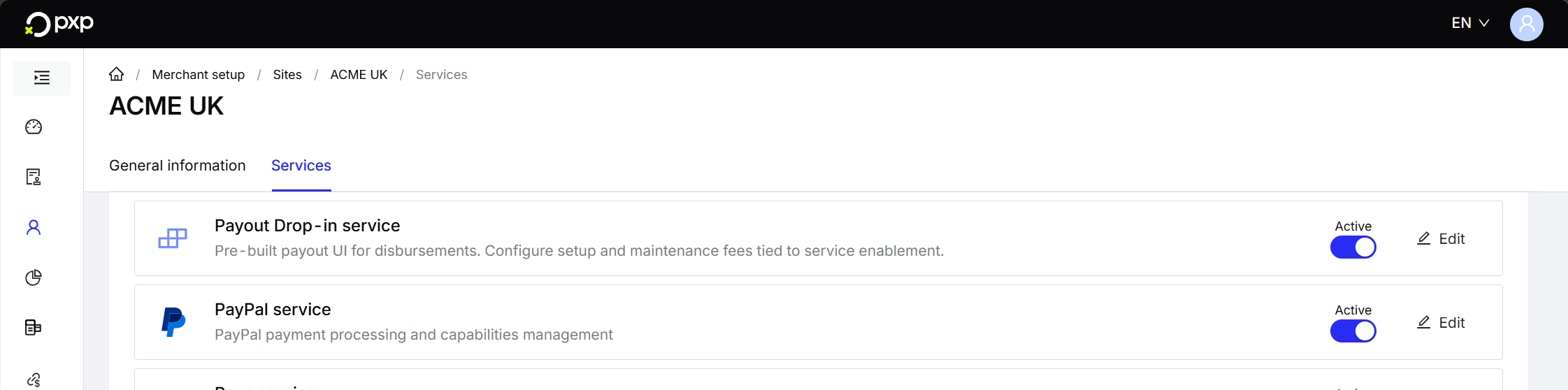
Your services are now activated.
Transactional fees apply individually for each payout method, regardless of whether the Drop-in service is enabled or not. Fees are charged per transaction based on your agreed pricing.
If you're planning to offer payouts with PayPal, Apple Pay, or Google Pay, you'll need to complete the onboarding process for each of these methods.
If not, you can go ahead and configure your authentication credentials.