Learn about how the PXP POS+ solution works.
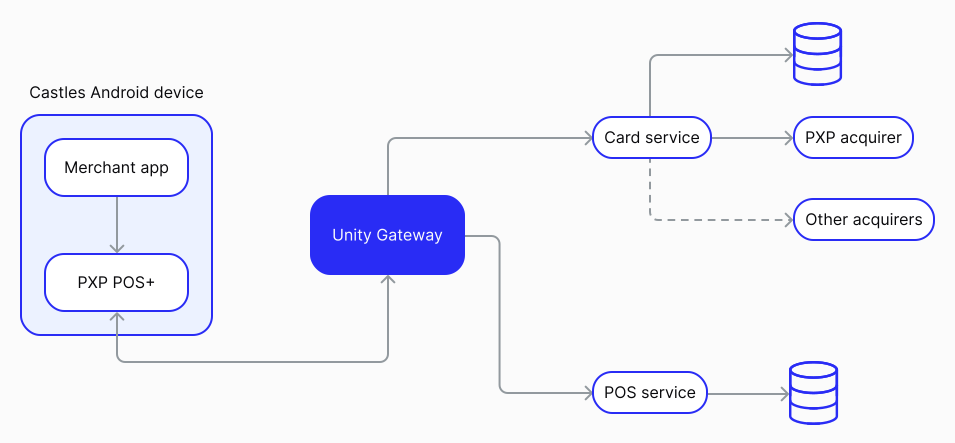
Your merchant app communicates with each PXP POS+ device using the local REST API or the SDK. The POS+ device communicates with the Unity Gateway, which allows it to access two core services: the Card service and the POS service.
Note that the location of the merchant app may or may not be on the physical device.
Your device comes with the PXP software pre-installed, so you can get started in just a few steps.
To activate your device:
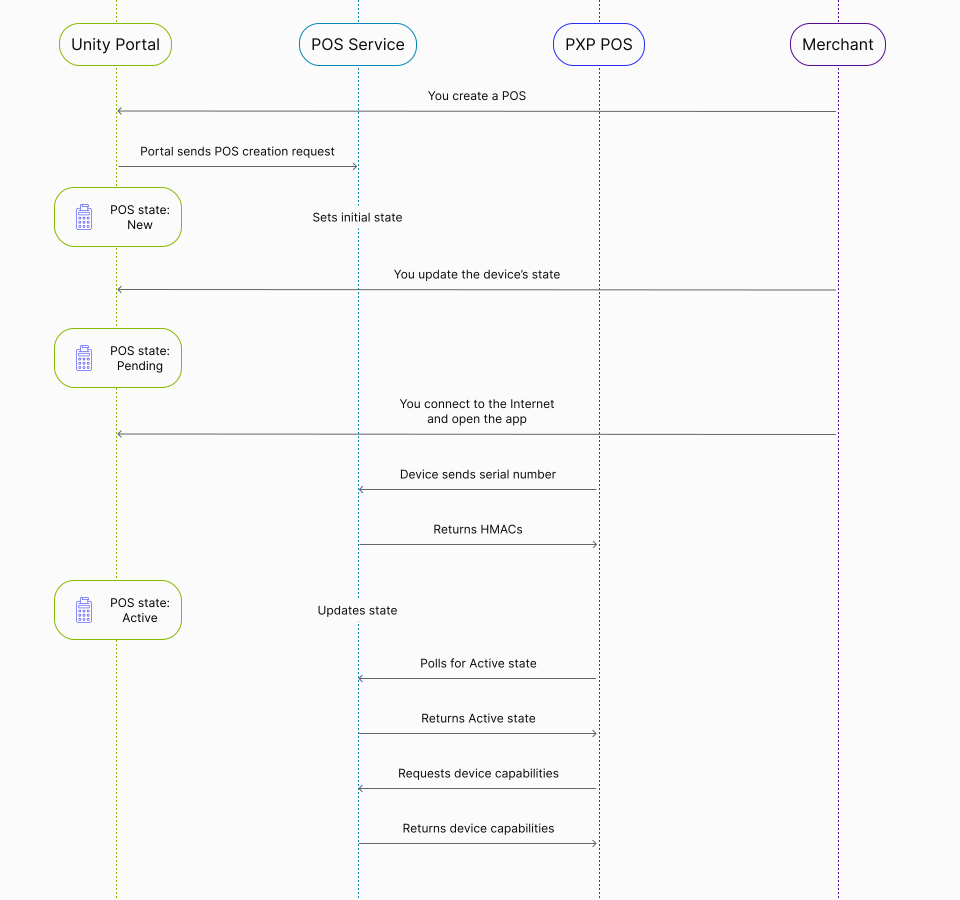
- Log in to the Unity Portal and create a new POS device. You can choose your own settings or keep the default ones to start with and update these later. At this point, the device's state is set to New.
- Set the device's status to Pending.
- Turn on the device and connect it to the Internet.
- Open the POS+ app. Your device then sends its serial number to the POS Service, which returns an HMAC used to authenticate it. The device's state changes to Active.
- The device automatically downloads the settings that were configured in the Unity Portal.
The device is now activated and ready to use.
To initiate a transaction, you have to provide key information about the transaction method, as well as the amount and currency.
The transaction method is made up of three elements:
- The entry type, which describes the origin of the transaction and determines the supported payment methods and available features. For POS+, this is always in-store.
- The funding type, which describes the method used to fund the transaction.
- The intent, which describes the purpose of a transaction, indicating the intended money flow direction. Each intent dictates a specific transaction flow and affects how the transaction is handled by the system.
The following table describes the possible intents that you can set when you initiate a transaction.
| Intent | Description |
|---|---|
Authorisation | Reserve funds on the customer's payment method. |
EstimatedAuthorisation | Reserve funds on the customer's payment method, based on an estimated amount. This method is particularly useful in environments such as hotels, car rental agencies, and fuel stations, where the final charge may vary based on additional services or usage. |
Purchase | Authorise and capture funds in one step, for direct purchases where the amount is known. |
Payout Coming soon | Send funds to a recipient. |
StandaloneRefund | Return funds to a customer. |
Verification Coming soon | Verify that a card is legitimate and active, without reserving any funds or completing a purchase. This method is particularly useful in environments such as hotels, car rental agencies, and other scenarios where it's important to validate the card upfront, but the final transaction amount may not be known or processed immediately. |
Once you've successfully submitted your request, you'll receive a 200 response. The content of this response will vary depending on your specific request, but there are several key elements to pay particular attention to.
These are:
- The transaction state. This state describes which step of the payment flow a transaction has reached at a given point in time. Learn more about states.
- The state data. This object contains a response code and message that provide detailed information about the transaction outcome, following the ISO 8535 standard. Learn more about state data.
- The gateway token ID. This token is generated and maintained by PXP and allows you to process recurring transactions or transactions using stored card details, without needing to provide full card details.
- The provider response. This object contains raw data received directly from the provider, such as the Payment Account Reference (PAR). Learn more about the provider response.
If you process Diners transactions with stored card details (card-on-file, recurring, or merchant-initiated payments), you must store the schemeTransactionId (network reference ID) for all Diners transactions starting 1 July 2026. Both this and the Retrieval Reference Number will be required for subsequent MIT/recurring payments.
The following table describes the possible states that a transaction can go through.
| State | Description |
|---|---|
Authorised | The card issuer has approved your request and the funds are reserved. |
Captured | Funds have been transferred to your account. |
Cancelled | The transaction has been successfully voided by you. |
Error | An error has occurred. |
Refused | The transaction has been declined. This could be due to incorrect payment details or insufficient funds. |
Every transaction response includes a stateData object containing a response code (stateData.code) and response message (stateData.message) that provide detailed information about the transaction outcome. These codes follow the ISO 8535 standard and help you understand exactly why a transaction was approved, declined, or encountered an error.
The response code and its corresponding message allow you to implement appropriate handling logic in your integration, such as displaying user-friendly messages, triggering retry mechanisms, or logging specific decline reasons for analysis.
The following table lists all possible response codes you may receive.
| ISO 8535 code | Description |
|---|---|
CRD000 | Approved |
CRD001 | Honour with identification |
CRD002 | Approved for partial amount |
CRD003 | Approved (VIP) |
CRD004 | Approved, update track 3 |
CRD005 | Approved, account type specified by card issuer |
CRD006 | Approved for partial amount, account type specified by card issuer |
CRD007 | Approved, update ICC |
CRD100 | Do not honour |
CRD101 | Expired card |
CRD102 | Suspected fraud |
CRD103 | Card acceptor contact acquirer |
CRD104 | Restricted card |
CRD105 | Card acceptor call acquirer's security department |
CRD106 | Allowable PIN tries exceeded |
CRD107 | Refer to card issuer |
CRD108 | Refer to card issuer's special conditions |
CRD109 | Invalid merchant |
CRD110 | Invalid amount |
CRD111 | Invalid card number |
CRD112 | PIN data required |
CRD113 | Unacceptable fee |
CRD114 | No account of type requested |
CRD115 | Requested function not supported |
CRD116 | Not sufficient funds |
CRD117 | Incorrect PIN |
CRD118 | No card record |
CRD119 | Transaction not permitted to cardholder |
CRD120 | Transaction not permitted to terminal |
CRD121 | Exceeds withdrawal amount limit |
CRD122 | Security violation |
CRD123 | Exceeds withdrawal frequency limit |
CRD124 | Violation of law |
CRD125 | Card not effective |
CRD126 | Invalid PIN block |
CRD127 | PIN length error |
CRD128 | PIN key sync error |
CRD129 | Suspected counterfeit card |
CRD180 | Retry in contact mode or SCA Ecom required |
CRD181 | Pick up card |
CRD182 | Bad format |
CRD183 | Timeout / Malfunction |
CRD184 | Card restricted |
CRD185 | Refused by fraud or scoring system |
The following table describes the different parameters included in a provider response.
| Parameter | Description |
|---|---|
providerstring | The name of the provider that processed the transaction. |
codestring | The raw result code returned by the provider that processed the transaction. |
messagestring | The raw message associated with the result code from the provider that processed the transaction. |
merchantIdstring | The unique identifier assigned by the provider to represent the merchant involved in the transaction processing. |
cardVerificationCodeResultstring | The Card Verification Code (CVC) result returned by the provider. This is a raw data indicating the outcome of the CVC check performed during the transaction processing. |
addressVerificationServiceResultstring | The Address Verification Service (AVS) result returned by the provider. This is a raw data indicating the outcome of the AVS check performed during the transaction processing. |
emvDataResponseobject | Response data from an EMV (Europay, Mastercard, and Visa) transaction. |
paymentAccountReferencestring | The Payment Account Reference (PAR) is a unique identifier assigned to a payment account, independent of the card number. It remains constant over the account's lifetime, even if the card number (PAN) changes. PAR enhances transaction security and privacy, serving as a secure reference point for cardholders, merchants, and issuers. It is used in digital transaction processing to reliably link transactions and accounts without exposing the actual card number. |
schemeTransactionIdstring | A unique identifier assigned by the card scheme (e.g., Visa, MasterCard) to each transaction. This identifier is crucial for tracking, reconciliation, and managing the lifecycle of the transaction, especially in contexts like chargebacks and fraud analysis. For card transactions, this could be the Visa Transaction Identifier or MasterCard Banknet Reference Number. Important for Diners (from 1 July 2026): For Diners transactions, this field returns the network reference ID (NRID). You must store this value for all Diners transactions as it will be required (alongside the Retrieval Reference Number) when submitting subsequent merchant-initiated or recurring payments. This is mandatory for PSD2 SCA compliance and Diners card scheme rules. |
schemeTransactionLinkIdstring | The unique identifier of the original transaction, as assigned by the card scheme (e.g., Visa, MasterCard). This identifier is used to link the original transaction to subsequent transactions, such as a refund or void. |
electronicCommerceIndicatorAdjustmentstring | The electronicCommerceIndicatorAdjustment field represents the Electronic Commerce Indicator (ECI) adjustment made by the payment scheme after the initial transaction authorisation. The ECI signifies the level of security applied to an online transaction, indicating the authentication and verification methods used. Adjustments to the ECI reflect a re-evaluation of the transaction's security level, which can be due to various factors such as risk assessment updates, compliance with security standards, outcomes of authentication processes, interchange fee considerations, or error corrections. An ECI adjustment can either upgrade or downgrade the transaction's security indicator, impacting interchange fees, chargeback liability, and the transaction's overall security assurance.Possible values:
06: Transaction attempted 3D Secure authentication but could not be completed; cardholder not authenticated (medium security). |
merchantAdviceobject | Provides additional guidance or recommendations from the card network regarding the transaction. This information is particularly useful for understanding the reasons behind a transaction's refusal and can offer suggestions for next steps. For instance, it might indicate that updated account information is available or suggest specific actions to resolve the refusal. The merchantAdvice object includes a code and message to detail this advisory information, making it easier for you to take corrective action or understand the refusal context. |
settlementDatedate | The date on which the transaction funds are settled between banks for MasterCard payments. This field is applicable and provided only for transactions processed using MasterCard. The settlement date is crucial for financial reconciliation and is formatted as YYYY-MM-DD. |