Reference for error messages returned by Tap+ and their descriptions.
Proper error handling is essential, as it ensures that your application can gracefully manage unexpected situations, provide meaningful feedback to users, and maintain system stability while protecting sensitive data.
When an SDK error occurs, you'll receive an error code (SDKXXXX) and descriptive error message.
The following table describes all the possible SDK errors codes.
| Error code | Description | Suggested action |
|---|---|---|
SDK0001 | An unknown error has occurred. | Log the error and contact support if recurring. |
SDK0002 | Network connectivity issue occurred. | Check your internet connection and retry. |
SDK0003 | Network operation attempted on the main thread. | Ensure network operations run off the main thread. |
SDK0004 | Request sent successfully from SDK to POS, but read/write data timed out. | Check the transaction status. Log the event for tracking and reach out to support if this occurs frequently. The auto-reversal should be handled by POS. |
SDK0005 | Failed to connect. | Verify the server address and network, then attempt to reconnect. |
SDK0006 | Illegal arguments. | Please check the arguments. |
SDK0007 | Invalid parameters. | Please check the parameters. |
| Error message | Display | Description |
|---|---|---|
Init PHOS SDK Failed! Device ID: 1fd3ea386c1956f5 | 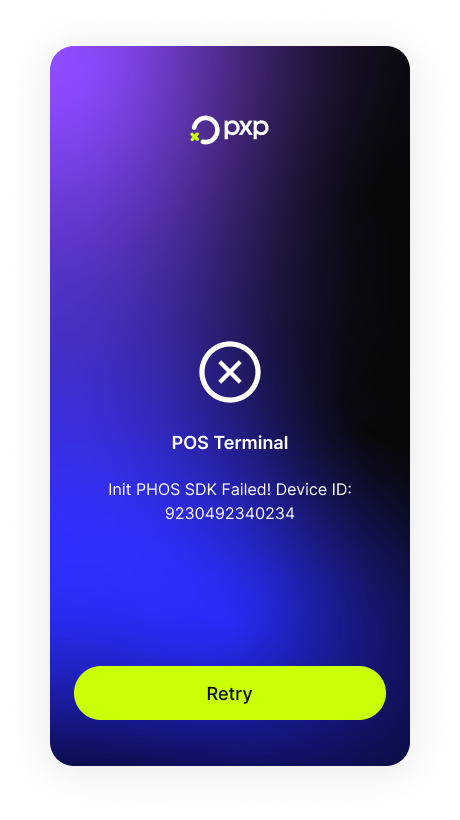 | This error appears when developer mode is turned on or a TCP connection failure occurs. |
{ "errorCode": "InvalidRequest", "errorReason": "Site identifier does not match the authorised value in configuration. Merchant identifier does not match the authorised value in configuration. Entry type must be 'Instore' for POS transactions Point of interaction is required." } | The site ID or merchant ID is incorrect. | |
Error during connection and listening - {specific error message}" - Environment Variable PHOS_INIT_STATUS set to "FAIL" | A PHOS initialisation failure occurred. | |
Serial number could not be found. Please re-enter the serial number and try again. | 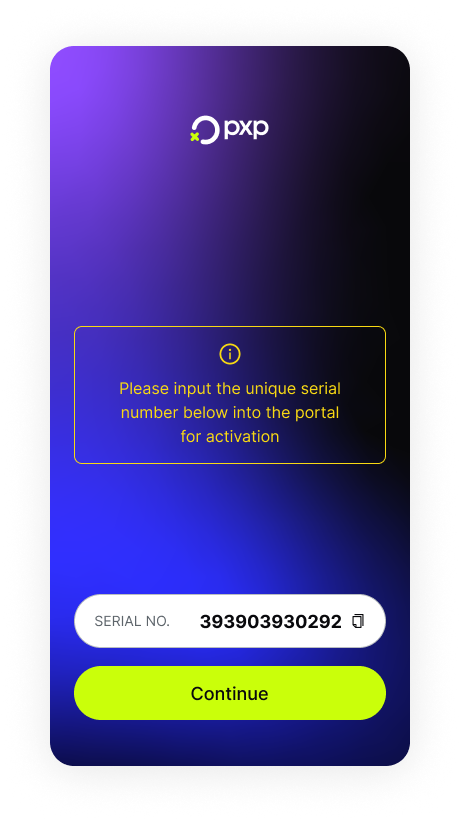 | An HMAC activation error occurred (HMAC activation not Found). |
Please enter the serial number below into the Unity Portal to complete the activation process. | The activation process is in progress. To complete it, enter the device's serial number in the Unity Portal. | |
{ "errorCode": "AuthorizationRequestFailed", "errorReason": "Invalid or missing HMAC signature" } | The HMAC signature is invalid or missing. | |
Polling Status Error | A polling status error occurred. | |
Transaction declined | A transaction failure occurred (void amount). | |
{ "errorCode": "InvalidRequest", "errorReason": "Merchant identifier does not match the authorised value in configuration." } | An invalid merchant ID was provided. | |
{ "errorCode": "InvalidRequest", "errorReason": "Funding type must be 'Card'" } | An invalid funding type was provided. | |
{ "errorCode": "InvalidRequest", "errorReason": "Entry type must be 'Instore' or 'Moto' for POS transactions" } | An invalid entry type was provided. | |
{ "errorCode": "InvalidRequest", "errorReason": "Point of Sale ID does not match the authorised value in configuration" } | An invalid point-of-sale ID was provided. | |
Invalid currency codes for POS '{pointOfSaleID}'. Default Currency Code must be exactly 3 uppercase letters and not be null. | An invalid currency code was provided. It should be in ISO 4217 format. For example, USD. | |
Funding type not found in request | The funding type is missing from your request. | |
Transaction amount should be greater than 0 for {entryType} transactions / Transaction amount is invalid | The transaction amount provided is invalid. | |
fundingdata.card.cardScheme has an invalid value | The card scheme provided is invalid. | |
Communication error when connecting to auth provider service '{authProvider}' | A communication error occurred. | |
Error when connecting to auth provider service '{authProvider}' | An error occurred when connecting. | |
General execution error when connecting to acquirer '{acquirer}' | A general execution error occurred. | |
Timeout when connecting to auth provider service '{authProvider}' | A timeout occurred. | |
Transaction method not found in request | The transaction method provided is invalid. | |
No auth provider has been set for merchant '{merchant}' | An authorisation error occurred. | |
Error when getting auth provider information for merchant '{merchant}' | A routing error occurred. | |
Error when connecting to BIN lookup service for card '{card}' | A BIN lookup error occurred. | |
A general execution error when connecting to BIN lookup service for card '{card}' | A BIN lookup error occurred. | |
Card '{card}' not found | A BIN lookup error occurred. | |
Error when connecting to card routing service for merchant '{merchant}' | A card routing error occurred. | |
Timeout when connecting to card routing service for merchant '{merchant}' | A card routing error occurred. | |
Communication error when connecting to card routing service for merchant '{merchant}' | A card routing error occurred. | |
General execution error when connecting to card routing service for merchant '{merchant}' | A card routing error occurred. | |
A card routing error occurred. | A card routing error occurred. | |
General execution error when connecting to point of sale service for site '{site}' and point of sale '{merchantPointOfSaleID}' | A point-of-sale service error occurred. | |
Communication error when connecting to point of sale service for site '{site}' and point of sale '{merchantPointOfSaleID}' | A point-of-sale service error occurred. | |
Error when connecting to point of sale service for site '{site}' and point of sale '{merchantPointOfSaleID}' | A point-of-sale service error occurred. |